
Camera workspace
A place for the whole setup.
Organise cameras by network and local groups, inspect health and manage supported arm/disarm and motion controls. Device commands carry pending states and observed read-back rather than assuming success.

A little more light on what happened.
Your cameras.
Your computer.
Your context.
A free, open-source companion for Blink cameras. Pair compatible Sync Module local storage with a PC archive and local AI, without a monthly Porchlight subscription or paid AI API.
Open source · Windows development build
More from the hardware you own
With compatible cameras and working Sync Module local storage, a paid Blink plan is optional. Porchlight can retrieve those recordings, sync them into your PC archive and add local AI analysis, searchable descriptions and owner-reviewed face recognition.
Requires compatible cameras, a supported Sync Module and working removable storage, such as USB on Sync Module 2 or microSD on Sync Module XR. Retrieval depends on hardware support and Blink connectivity; Sync Module Core has no removable local storage. Check Blink storage compatibility ↗
The product idea
Porchlight connects the everyday camera experience with the things that happen after a clip is saved: finding it again, understanding the visible activity, reviewing a possible match and deciding what to keep.
Camera workspace
Organise cameras by network and local groups, inspect health and manage supported arm/disarm and motion controls. Device commands carry pending states and observed read-back rather than assuming success.
Recording archive
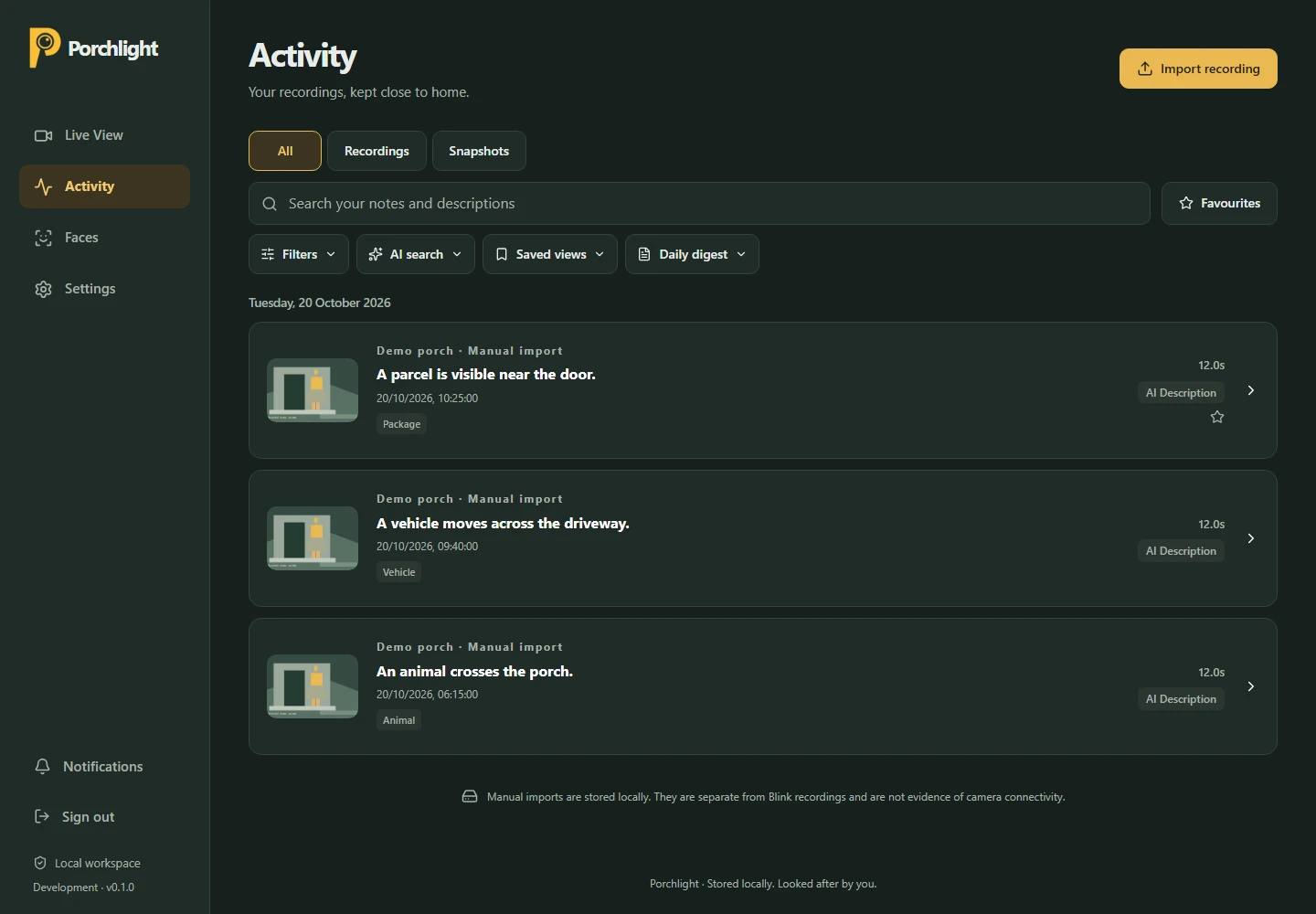
Bring archived Blink clips, manual MP4/JPEG imports, live recordings and snapshots into one date-grouped Activity view. Play, export, favourite, annotate and correct what you keep.
Search & recall
Search notes and descriptions, filter observed categories and colours, save useful views or preview natural-language filters before applying them. On-demand daily digests collect the day’s saved context.
Everyday operations
Notification rules, quiet hours, snooze, a local inbox and optional browser push sit alongside retention previews, verified backup/restore and separate worker diagnostics.
From recording to insight
The archive and the analysis have different jobs. Explore how a recording moves through local processing without making AI a prerequisite for keeping the original.
Illustrated workflow · fixed example
Illustration only · no camera connection
Archive
On a compatible no-plan setup, clips are retrieved from Sync Module local storage into the PC archive. Blink cloud clips and manual imports can also enter the archive. Durable downloads keep preservation separate from AI analysis.
A model failure does not need to become a lost recording.
Frames
FFmpeg extracts bounded frame samples. Light and Balanced workloads trade resource use against coverage. Sample times and frame hashes make accepted evidence reviewable.
Sampling can miss brief activity. The original remains the reference.
Ollama
A local Ollama vision model returns structured observations. Schema and evidence checks validate the response before it becomes a saved analysis revision.
No cloud inference fallback or paid AI key is required.
Review
Open the sampled evidence, play the original, correct the description and add labels or notes. Face recognition remains a separate, optional source of possible matches.
A description or possible face match is an aid to review, not proof.
Optional local face recognition
Activity descriptions and identity suggestions are separate systems. Ollama describes what is visible; YuNet and SFace support an owner-reviewed recognition workflow.
Optional YuNet detection finds faces in sampled frames and surfaces timestamps, boxes and image-quality flags. Automatic detection starts off.
The owner reviews source recordings and assigns selected clear examples to a person. Suggested groups remain tentative until checked.
SFace compares later samples against locally saved exemplars. Uncertain or low-quality comparisons stay unnamed, and possible matches remain reviewable.
Possible match. Always reviewable. Names begin with the owner’s selected examples. Suggestions do not establish identity, and recognition does not automatically disarm a camera or trigger an emergency action.
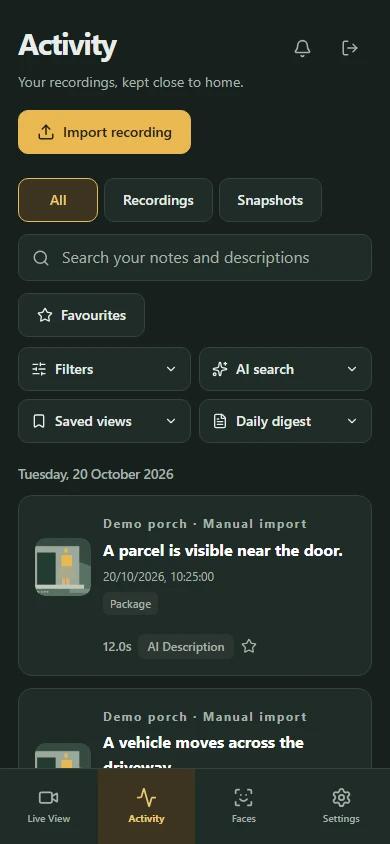
One workspace, different screens
A responsive interface keeps Activity, Faces, Live View and Settings within reach. Home-screen installation and optional browser push extend the local workspace to a phone.
Phone access depends on the host PC being awake and reachable. Browser push uses browser-vendor delivery infrastructure.
The system underneath
One Windows-native service brings the interface, jobs and archive together. No hosted database, Docker or cloud AI service is required for the core installation.
On the owner’s PC
SQLite-backed jobs separate discovery, downloads, AI and face detection. Leases, retry limits and restart recovery let the archive continue when a model or optional worker is unavailable.
Frame selection records timestamps and hashes. Schema and evidence validation guard accepted observations, while sampled-image review connects a description back to the original.
FastAPI serves the Vite build from the same origin. SQLAlchemy and Alembic manage local SQLite data; FFmpeg handles bounded media work. Native Ollama stays on loopback.
Authenticated playback, CSRF-protected changes and Windows DPAPI-backed secret storage sit alongside previewed retention and backup checks. SFace exemplars are encrypted for the Windows user.
Clear product boundaries
Porchlight is an independent Blink companion. The recording archive and AI processing are local, while new Blink retrieval and live sessions still depend on Blink’s services.
Live View, recording, snapshots, audio and camera controls depend on device capability. Live sessions are bounded, with no two-way talk or continuous recording claim. Subscription-free retrieval depends on eligible hardware and verified recording access.
AI descriptions and face suggestions can be wrong or miss brief activity. The original recording and owner review stay central to the experience.
Start a conversation
A practical problem. An ambitious idea. A system that could work better. Tell me what’s on your mind.
What would you love to stop doing manually?
One small hello. A new possibility.
Thanks for reaching out. I’m looking forward to hearing more.
Sent to Kevin